ClickNote
ClickNote
Try the live demoStart free trial

The demo needs no sign-up. The trial needs no card.

Open dashboard
Choose a plan
Dashboard
Start free trial

The trial needs no card.

Website feedback tool for web agencies Client feedback that’s easy to give and easy to act on.

Your client clicks the thing they mean and writes a note: no account, no extension, no screenshots by email. You get the selector, a screenshot and the device, all under your agency’s name.

  • Demo needs no sign-up
  • 14-day trial, no card
  • Clients need no account
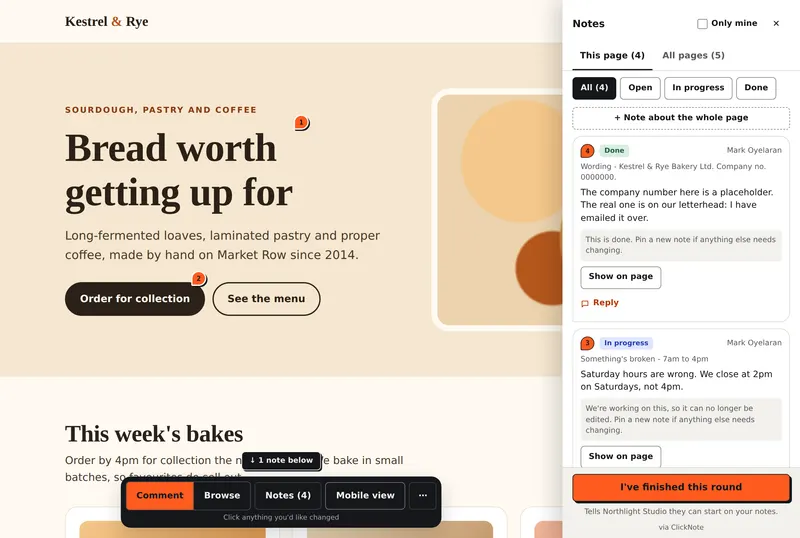
A client reviewing a bakery's website with ClickNote: numbered pins on the page, the reviewer toolbar at the bottom and a panel listing their notes with the status of each.
Sample project from the live demo

Made by an agency, for agencies. We built ClickNote for our own client work first, then opened it up to other agencies.

Reviewers
Free and unlimited
Snippet
Under 1 KB, idle for visitors
AI agents
MCP on every plan

How it works

Click it. Note it. Ship it.

  1. Add one snippet, share a link

    Paste one script tag into the client’s site and send them the review link. Normal visitors load nothing extra.

    <script src="https://feedback.youragency.com/l.js" data-project="PROJECT_ID" async></script>
  2. Your client clicks and writes

    They confirm their email with a one-time code, click any element and say what should change. No account, no extension.

  3. You get a note you can act on

    Page, selector, screenshot, device and theme file, with a status and a thread. Hand it to a developer or an AI agent.

White-label

Your name, your logo, your domain

The widget, the emails and the address can all be yours, so the review feels like part of your service, not a tool you signed up to.

  1. Every planYour name and logo in the widget and every email, and a private ClickNote address for your links.
  2. Agency and ScaleYour own subdomain with one CNAME, email sent from your domain, and no “via ClickNote” line.
  3. Scale5 brands in one workspace, each with its own name, logo and domain.

See what each plan includes

What every note captures

Feedback that points

“The thing at the top, sort of on the left” is not a brief. Every note records what was clicked and where it lives, so the fix starts in the right file.

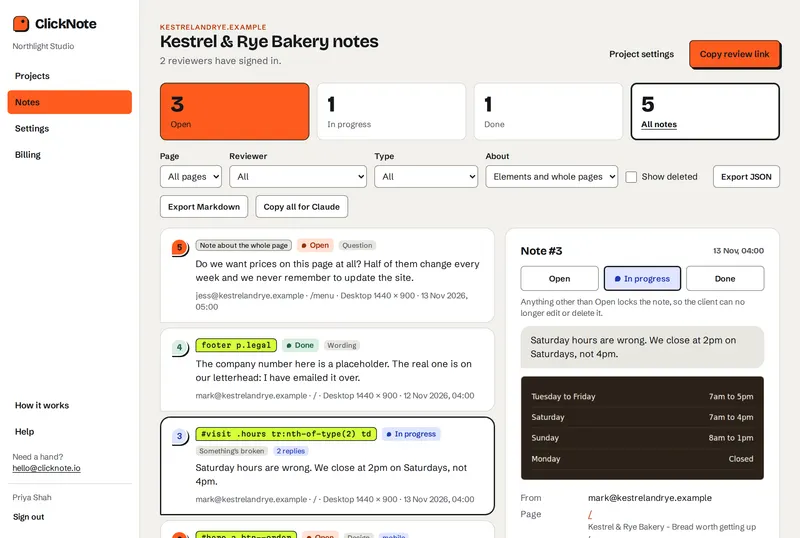
The ClickNote dashboard: a project's notes with their CSS selectors and statuses, and one note open with its screenshot, page and thread.
What you get. The same sample project, in the dashboard.
The element
Selector, XPath, text, HTML snippet and where in it they clicked.
The view
A screenshot, the URL, viewport, browser and device layout.
The theme
Shopify section and block, WordPress template and builder id.
Pins that hold
When the page changes, a pin finds its element again.

Never captured: what anyone has typed into a form field.

Rounds, threads and people

Built for the way agencies run a review

Rounds with an end

Clients press one button when they have said everything, and you are told.

Statuses clients can see

They can edit or delete a note until work starts on it.

Threads and @mentions

Replies stay on the note, next to the thing they are about.

Nothing raised twice

Teammates see each other’s notes, so one typo is one note.

Invite-only projects

Limit a project to the addresses you list. Invites sign in with one tap.

Notes to yourselves

Internal notes clients never see, with owner, admin and member roles.

For developers and AI agents

Notes an agent can act on straight away

Copy for AI agent

One button turns a note, or every note you have filtered, into a brief for Claude or a developer.

Copy for AI agentMarkdown
## Feedback #3 - Copy change (open)
Page: https://haldenceramics.example/ ("Halden Ceramics")
Platform: Shopify, theme "Halden" (live), template index
Where: Shopify section "hero_banner_k7Lm2Q" in templates/index.json, likely sections/hero_banner.liquid > Block heading
Element: <h1> h1
Selector: section.hero > h1
XPath: /html/body/main/section[1]/div/h1
Element text: "Tableware made to be used every day"
Device: Chrome on macOS (desktop browser); viewport 1440x900 = desktop layout, clicked at 62% across / 48% down the element
Reviewer: priya@haldenceramics.example
Comment:
> Can this say "made in Cornwall"? It's the first thing people ask us.
HTML:
```html
<h1 class="hero__title">Tableware made to be used every day</h1>
```

An MCP endpoint on every plan

Claude Code, or any MCP agent, can read notes and update them without leaving the editor.

Terminal
claude mcp add --transport http clicknote https://app.clicknote.io/mcp \
  --header "Authorization: Bearer <key>"

list_projects · list_comments · get_comment · update_status · add_internal_note

Read the MCP guide

Pricing

Flat pricing. Your clients are always free.

Starter

For freelancers and small teams with a handful of client sites.

Black Friday: 20% off

$19 $15.20a month

or $190 $114 a year (40% off)

Black Friday: 40% off

$190 $114a year

or $19 $15.20 a month (20% off)

  • 10 active projects, 3 team seats
  • Your name and logo on the widget and emails
  • Slack, Teams, Discord and Google Chat
  • ClickNote address, small “via ClickNote” line

Scale

Several brands, each with its own domain, and no ceiling on projects.

Black Friday: 20% off

$99 $79.20a month

or $990 $594 a year (40% off)

Black Friday: 40% off

$990 $594a year

or $99 $79.20 a month (20% off)

  • Unlimited projects, 25 team seats
  • 5 brands, each with its own domain
  • Everything in Agency
Black Friday offer: start a trial and choose your plan by 30 November. The first payment is still taken when the trial ends. The discount is on every payment for as long as your subscription runs, and ends if you cancel.
Every plan: unlimited free reviewers, your name and logo, MCP access. The trial is the Agency plan for 14 days, no card. Prices in US dollars, before tax.Compare every feature

Comparing tools? See ClickNote next to BugHerd, Feedbucket, Marker.io, MarkUp.io, Pastel and Userback, or what each one costs.

Questions

Things agencies ask before switching

Something else? Ask us: a person reads every message and replies by email.

Do my clients need an account or a browser extension?

No. They open the review link, confirm their email with a one-time code and start clicking. Nothing to create, remember or install.

Will the snippet slow my client’s site down?

No. It is under 1 KB and does nothing for normal visitors: no extra request, no DOM change, no effect on Core Web Vitals.

Does it work on staging sites and password-protected stores?

ClickNote does not load your client’s site through a proxy, which is where staging sites tend to break. The snippet runs on the page itself, so the reviewer is looking at the real site in their own browser.

On a Shopify store that is still password-protected, add the snippet to password.liquid as well as theme.liquid.

Is white-labelling locked to the top plan?

No. Your name and logo are on the widget and on every email to clients on all three plans. Your own domain, email from your own domain and removing the small “via ClickNote” line start on the Agency plan at $59 a month.

How do seats and projects work?

Seats are for your own team. Reviewers are free and unlimited on every plan.

What will it actually cost?

A flat price per workspace: $19, $59 or $99 a month, with two months free if you pay yearly. Nothing is charged per reviewer, so the bill does not grow when a client brings five colleagues along. VAT or sales tax may be added at checkout.

Can Claude or another AI agent read the notes?

Yes. Every plan includes an MCP endpoint, so Claude Code or any MCP-capable agent can list your projects and notes, read a note with its full element context, set its status and add internal notes.

There is also a Copy for AI agent button in the dashboard. It puts one note, or all the notes you have filtered, on your clipboard as a ready-to-paste brief.

What happens when the trial ends?

You pick a plan. If you do not, review links pause and your notes are kept for 90 days.

Who makes ClickNote?

An agency, for agencies. It is run by Peak Digital Ltd, our UK company.

See it on a sample site before you sign up

A private sample workspace with a client site and notes already on it. No sign-up, and it is deleted 12 hours after you open it.

14-day free trial. No card needed.

Live demo

Try the live demo

We will set up a demo account for you.